
Study methods
Build vocabulary from your own material
Choose words for a concrete task, check how they enter the App and keep the first plan small enough to inspect.
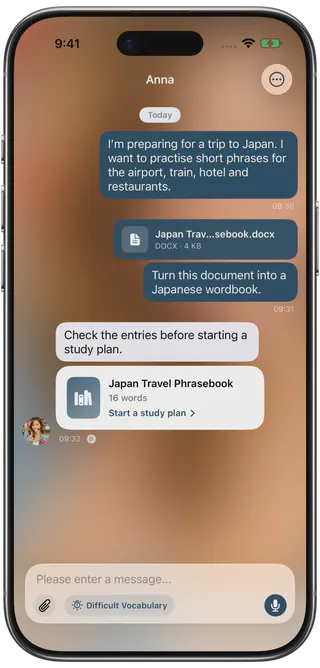
Import your own materials
Bring your own content into a learning plan.
Bring material you actually want to learn. FreeLingo prepares candidate entries for you to check before creating or adding to a study plan.
- Paste textPaste an article, notes or a list, then inspect the extracted entries.
- Read an imageUse text recognition on an image you have permission to use, then check recognition errors.
- Photograph a pageCapture a book or handout and check the recognised text before studying it.
- Extract from videoUse the App video workflow to extract speech as text and prepare candidate vocabulary.
Review before you study
Check the entries before creating a plan.
Preview the candidate entries, use available basic-word filtering and remove duplicates. Check spellings and notes here; inspect generated meanings in the first word cards after starting the plan.
- Documents
- Pasted text
- Images
- Camera
- Video
Give the wordbook a purpose
Start with a task you can describe: understanding a course section, preparing for a conversation or reading a work document. Collect entries from material you are entitled to use. A useful wordbook is a selected set for that task, not necessarily every word that can be extracted.
Keep the source and context available so you can check ambiguous forms or meanings later. The target language and the explanation language must fit the plan.
Choose an input you can verify
| Source | Starting point |
|---|---|
| A paragraph or notes you can copy | Paste text and check the candidates |
| A TXT list or spreadsheet | Import the list |
| A supported document or e-book | Use document import |
| A screenshot or printed page | Recognise an image or photograph the page |
| A video in your photo library | Use the video entry point to extract text from its speech, then check the transcription and vocabulary |
Video extraction does not guarantee complete subtitles or perfect speech recognition. Images and documents also need checking; a supported source is not a quality guarantee.
Check two stages
First, compare candidate word forms and notes with the source. Remove duplicates, filter basic words where helpful and keep the items you actually need. Basic-word filtering does not know your personal level.
Second, after creating or extending a plan, inspect the generated cards. Check meanings in context, spelling and available audio. AI examples and notes need review and may differ by language or entry.
Use the same routine for different sources
Imported material and ready-made wordbooks share the study-plan and review workflow. Choose a manageable daily amount, study the cards, use eligible practice and confirm that formal results save. Return to review when due.
You can use several sources without creating an unmanageable backlog. When reviews accumulate, reduce new material first. Check free and membership limits before relying on several active plans or a long imported list.
FAQ
Frequently asked questions
How can I create my own wordbook?
Paste text, import a supported document, recognise an image, photograph a textbook or extract text from a video’s speech. Review the resulting entries before setting up a plan.
Can I change what is included?
Yes. Inspect candidate forms and notes, remove duplicates and use basic-word filtering where appropriate. This does not replace your judgement of what you know or need.
Can I use custom material alongside ready-made wordbooks?
Yes. Both use the same study and review workflow. Keep the plan’s target and explanation languages consistent.
Can video become vocabulary material?
The video entry point extracts text from speech in a video in your photo library, then prepares target-language candidates. Check transcription and selection; this is not a guarantee of complete or accurate subtitles.
Start today
Start with words you need.
Try a small amount of your own material, check the cards and follow the study and review workflow.
 Scan to choose your App Store region