
Open in your browser to download
- Tap the top-right ···
- Choose “Open in browser”
- Tap “Free download” in Safari
Shared from a friend’s practice
Vocabulary activities · Active
Word Slice
Slice distractors and leave the answer intact
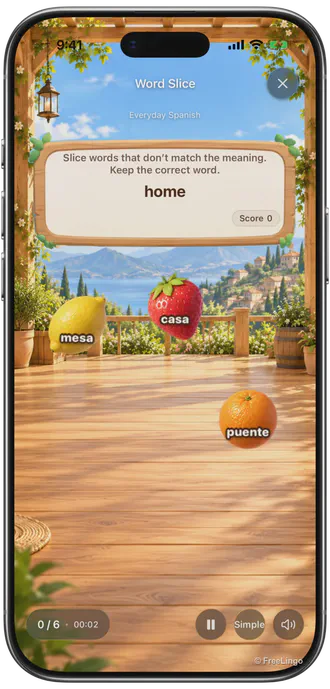
Read the meaning, slice the distractor fruit and leave the matching word. For a different physical way to practise recognising words.
- Work at your own paceTime depends on the material and activity
- At least 1 wordsSuitable meanings and questions are also required
- Learning tasks and extra practiceComplete and save the task to record it
For a different physical way to practise recognising words
How it works
Word Slice in three steps
Read the meaning, slice the distractor fruit and leave the matching word.
- 1
Read the meaning first
Several pieces of fruit carry words. One word matches the meaning on the board.
- 2
Slice distractors, not the answer
Swipe through fruit with non-matching words. Leave the correct word intact and let it fall naturally.
- 3
Try uncertain words again
Cutting the answer or missing a distractor brings that word back later. Correctly retain each word once to pass the group.
Practice with a purpose
A different way to revisit the same words
Rule out the alternatives
Before slicing, decide whether each word is the answer to the prompt.
Check what the result means
Words with errors return during the activity. The final result describes this attempt, not long-term mastery.
Know which task you are completing
Enter from an eligible new-study or due-review task, complete the required steps and save. Check the original task afterwards. Training, early practice and replay do not replace due review or change later dates.
Recognise the connection again
The same words appear in different activities that ask you to recognise a word and its meaning. Movement and route planning are separate demands, so interpret them separately from vocabulary answers.
One correct answer is one observation
Review words, meanings and hint records in the results, then return to the cards for anything uncertain. A result is not proof of lasting mastery. Replaying is extra practice.
Already have FreeLingo?
Open Word Slice after your word cards
- 1
Start a new-study task and read the cards
Choose suitable material and set the target and explanation languages. Create a plan first if you do not have one, then open today’s new words.
- 2
Choose an available activity afterwards
After studying the cards, choose an available test in the next step. To use 「Word Slice」, check that the current material and entry point allow it.
- 3
Finish, save and check the task
Complete the activity requirements, review the results and finish the workflow. After saving succeeds, return to the original task and check its status.
Choosing a mode earlier in the Fun Center does not mean the App will automatically return to that mode after new study. Training, early practice and previews are separate from formal tasks.
Word count is only one condition: entries also need usable meanings and eligible prompts. Memory Match needs at least two words and Word Link needs at least four. Pinyin-only content is not ordinary word–meaning test material.
Try another activity
Explore other activities
Quiet · Word and meaning practice
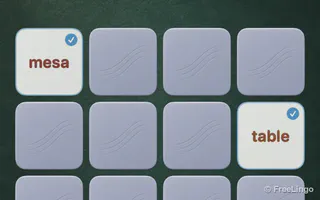
Memory Match
Turn over two cards and find a word’s meaning
Quiet · Word and meaning practice
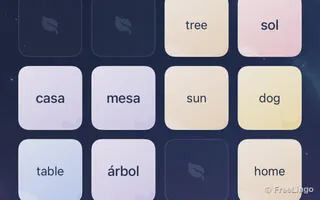
Word Link
Join matching cards with at most two turns

Active · Word and meaning practice
Word Catch
Move the corgi to catch the matching word

Light · Word and meaning practice
Word Mole
Read carefully, then tap the matching meaning
Puzzle · Word and meaning practice
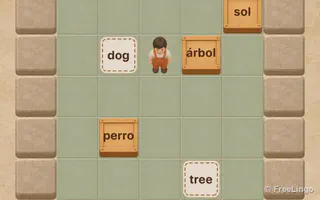
Word Box
Plan a route and push each word to its meaning
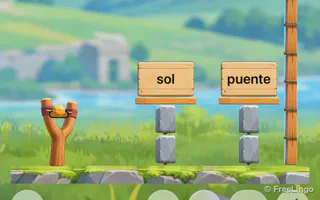
Aim · Word and meaning practice
Word Tower
Read the meaning and aim at its word box

Movement · Word and meaning practice
Word Crossing
Cross the street to the matching meaning
Screenshots, characters and card artwork © 2026 FreeLingo. Shown to explain the product; copying, redistribution or reuse in other products requires written permission.
FAQ
Frequently asked questions
How does Word Slice work?
Read the meaning, slice the distractor fruit and leave the matching word. Swipe through fruit with non-matching words. Leave the correct word intact and let it fall naturally.
What should I check after finishing?
Review the results and unfamiliar words. For a formal study task, finish the required workflow and confirm a successful save, then check the original task. Training and replay are extra practice.
Does completing this mode mean I have mastered the words?
Before slicing, decide whether each word is the answer to the prompt. One attempt does not establish long-term mastery.
Start today
Study the cards, then try Word Slice.
Choose this activity when your material and study entry point support it.
 Scan to choose your App Store region