
AI learning
AI help for the material you are studying
Bring the word, sentence or passage and explain what is unclear. Use the answer to guide your next question, then check it before you study.
AI-assisted learning
Word cards, chat and Feed for everyday learning.
Bring an actual word or sentence and a specific question. Use AI to support understanding, check the answer, then return to study and review.
Understand a word in context
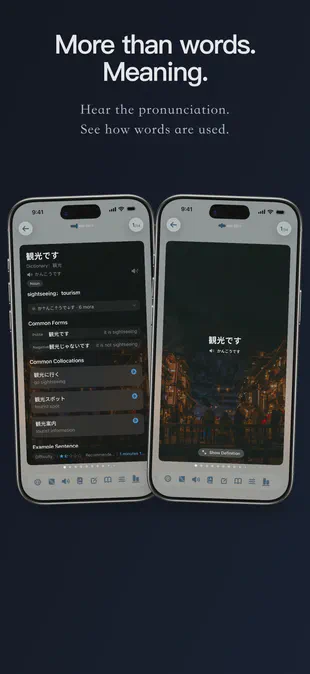
Read meanings alongside available pronunciation, examples, collocations and word-form notes. Fields vary by language and entry, and generated explanations need checking.
- Pronunciation and script information where available
- Word forms, usage and example sentences
- Language-specific hints vary by entry
- Check important details against a reliable source
Keep asking about the actual sentence
Give the assistant the word, sentence and context that raised your question. Ask for a short explanation, then check it before using the result in your work or learning.
- Ask about an actual word or passage
- State the language you want the explanation in
- Ask it to distinguish evidence from uncertainty
- Prepare a wordbook from a supported document
- Check entries before creating or adding to a plan

Revisit familiar words from another angle
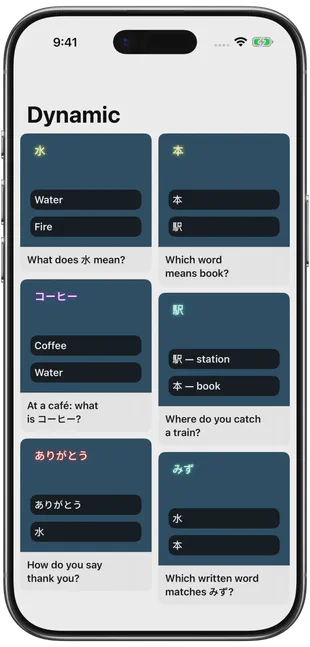
AI Feed generates cards from words you have studied. Treat the new examples and explanations as material to check and practise with.
- Confusable words
- Usage in context
- Word families
- Situations
- Possible misuses
- Emotion and tone
Some learning content is supported by machine learning. This content is a learning aid and does not replace authoritative dictionaries, textbooks, official exam standards or professional language resources.
Ask a question with enough context
A useful request includes your target language, your current level, the original sentence and the point you want explained. For example: “Explain the role of this word in the sentence. Answer in English and show which part of the sentence supports your explanation.” This is a suggested input, not a recorded response or a guarantee of what the assistant will produce.
If you are preparing for an exam, give the relevant course or official exam context. For specialist work, keep the source terminology nearby. Check important distinctions against a suitable dictionary, textbook or official reference.
From an answer to study material
The assistant can help look up words, find wordbooks, explain difficult material and prepare learning tasks. Review proposed entries and language settings before confirming a new task or adding them to an existing one. A generated explanation is not automatically a verified wordbook.
Word-card fields vary by language and entry. AI Feed offers different ways to revisit studied words, such as contrasting similar words or looking at a word family. Neither feature guarantees that every entry has every field.
Know the limits
Some learning content in FreeLingo is supported by machine learning. AI-generated content can be inaccurate, incomplete or unsuitable for a particular context. Check important details against suitable sources. It does not replace a teacher, authoritative language reference or official exam requirements. Audio playback does not automatically correct or score your pronunciation.
AI conversation and related file tasks require a connection and have daily allowances. Check usage limits and the current App prompt before uploading a file or starting another request. For the wider study workflow, see the product guide.
FAQ
Frequently asked questions
Can the assistant help a beginner or explain difficult reading?
Give the assistant the letters, words or passage, your level and the point that is unclear. It can help explain the material, but generated explanations need checking and do not replace a human teacher or pronunciation assessment.
What are the AI features?
Word cards may include meanings, examples, collocations or word-form notes. The assistant helps with lookup, wordbooks, explanations and creating study tasks. AI Feed revisits studied words through six types of prompts. Fields depend on the language and content.
Is AI use limited?
Yes. Chat and related file tasks have a shared daily allowance. See usage limits and the current App prompt.
Can I rely on every AI explanation?
Some learning content in FreeLingo is supported by machine learning. AI output can be inaccurate, incomplete or inappropriate for a particular context. Check important points against a reliable dictionary, course material or official exam source.
Do AI features work offline?
AI conversation, browsing resources and some AI card operations require a connection. Previously stored cards and available local audio can be used offline.
Can words from a conversation become a plan?
After you confirm the proposed content, you can create a new task or add to an existing one. Check the entries and language settings before continuing.
Are the voices AI-generated or recorded by people?
FreeLingo uses high-quality AI voices and also retains human-recorded audio resources. The source varies by language, entry and activity; check the current entry. Listen, repeat and use listening review where available. Playback does not provide automatic pronunciation correction or a pronunciation score. See audio sources and listening.
Start today
Start with words you need.
Try a small amount of your own material, check the cards and follow the study and review workflow.
 Scan to choose your App Store region